

Lukas Schönbächler · June 2026 · 5 min read
Why this matters
- Acronis Cyber Files reached end-of-life on 31 December 2025. The last security updates stop on 31 December 2026 — after that, no patches and no support.
- Acronis isn’t offering an on-premises replacement or a migration path.
- Running it past that point means an unsupported, internet-connected system holding your files — a real security and compliance risk.
- For what most teams used it for — getting mobile devices to your on-prem file servers — you don’t need new servers or a move to the cloud. A managed app over the VPN you already run does it.
- Start now: the move is straightforward, and you have until the end of 2026.
If you use Acronis Cyber Files to give phones and tablets access to your on-premises file servers, it’s already living on borrowed time. The product reached end-of-life on 31 December 2025, and the final security updates stop at the end of 2026. After that it keeps running, but nothing gets fixed and no one is there to help.
The good news: replacing it is simpler than the original rollout was. Here’s what changed, what you’re actually replacing, and how the move works.
What’s ending
Two dates matter. Acronis Cyber Files — and its companion, Acronis Files Connect — reached end-of-life on 31 December 2025. Extended support, the last chance for security fixes, runs until 31 December 2026. After that you’re on your own.
One thing to clear up, because it causes confusion: Acronis Cyber Files Cloud is a different, still-active product. It’s only the self-hosted, on-premises version that’s ending — and Acronis hasn’t named a replacement for it.
What you’re actually replacing
Most organizations used Acronis Cyber Files for one main thing: letting mobile users reach the same file shares they use at their desks, without putting that data in the public cloud. It could also do personal file sync and external sharing — but those are a separate need, and if you relied on them, Microsoft 365 or a dedicated sharing tool is the better home for them now.
This guide focuses on the main job — mobile access to your on-prem files. It’s the part that’s hardest to replace, and the part Hypergate Files is built for.
A simpler setup
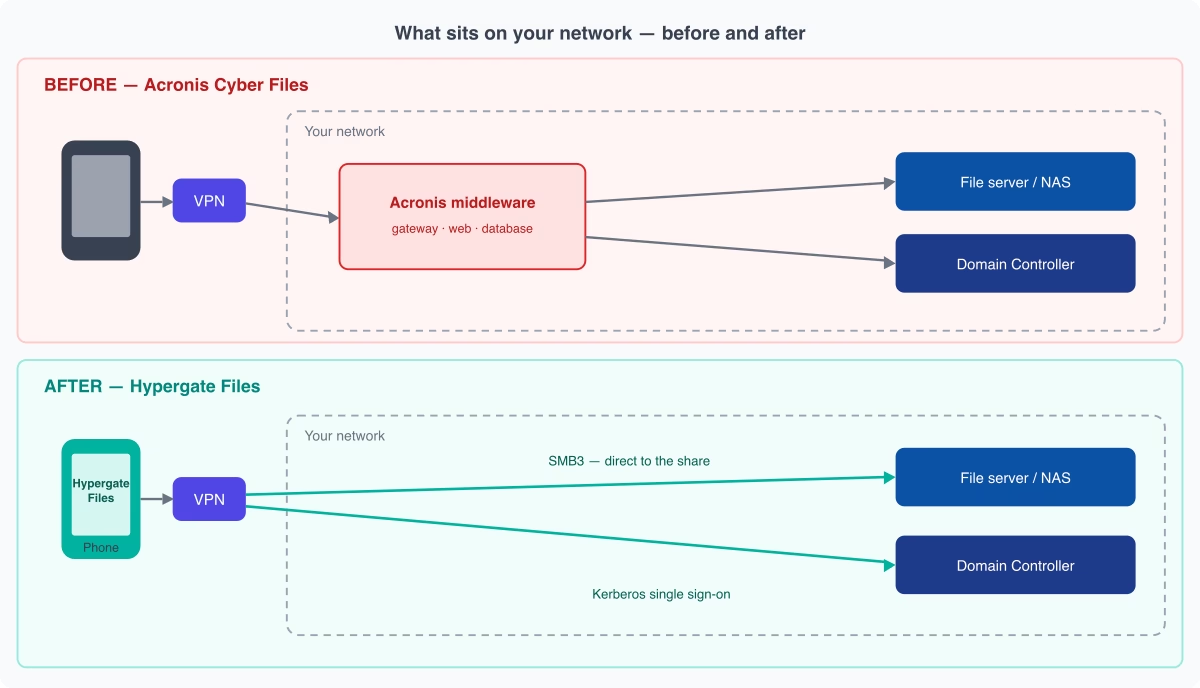
The real difference is what each approach needs on your network. Acronis sat a stack of servers — a gateway, a web server and a database — between your mobile users and your files; those are the components you host, patch and maintain. Hypergate Files removes that middle tier. Phones connect through the same VPN they already use, then reach your file servers directly over SMB and sign in against your existing domain controller with Kerberos single sign-on. Same network you already run — minus the Acronis servers in between.
What changes
Here’s where each piece of what Acronis did lands after the move:
| What you used Acronis Cyber Files for | Where it goes |
|---|---|
| Mobile access to your file servers and NAS | Hypergate Files, connecting directly across your network |
| Single sign-on with your existing accounts | Hypergate Authenticator — no extra logins |
| Keeping each user’s existing file permissions | Unchanged — people see exactly what they’re allowed to |
| Opening and editing documents | The phone’s normal apps (Word, Excel, PDF readers) |
| Locking down copy, print, screenshots and „open in“ | Your device-management platform (Intune, Jamf, Workspace ONE, and others) |
| Keeping files safe on the device | Nothing is stored on the device at all |
| The Acronis servers, database and gateway | Gone — there’s nothing to host |
| Personal file sync, external sharing, SharePoint | Handled by Microsoft 365, not this tool |
Two of those are worth a word. Hypergate Files keeps nothing on the device, so a lost or stolen phone has no company files on it to worry about. And the items handled elsewhere — sync, external sharing, SharePoint — are deliberate: it’s a focused access tool, not an everything-suite.
How the move works
The migration is short and low-risk, and you can pilot it before committing:
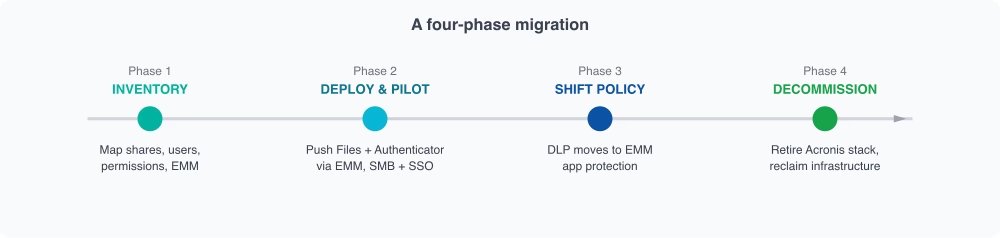
- Inventory. List which file servers your mobile users actually reach, and who needs them.
- Pilot. Roll Hypergate Files out to a small group through your device-management platform, point it at your existing shares, and check they can open files just like on their desktops.
- Shift the controls. Move the copy, print and sharing restrictions you had in Acronis into your device-management platform.
- Decommission. Once it works for everyone, switch off the Acronis servers and reclaim them.
Where this leaves you
When you’re done, mobile access runs through a single managed app over the VPN you already have — no servers to patch, no database to maintain, nothing extra exposed to the internet, and less to worry about if a device goes missing. It’s a smaller, safer setup than the one you’re retiring. The only real deadline is finishing before support ends at the end of 2026, so it’s worth starting while this is a planned project rather than an emergency.
Planning your move off Acronis Cyber Files?
See how Hypergate Files gives managed Android and iOS devices secure access to your on-prem file servers — with no server to host — or talk through your migration with our team.